Enterprise desktop2.0.100
Publisher Description
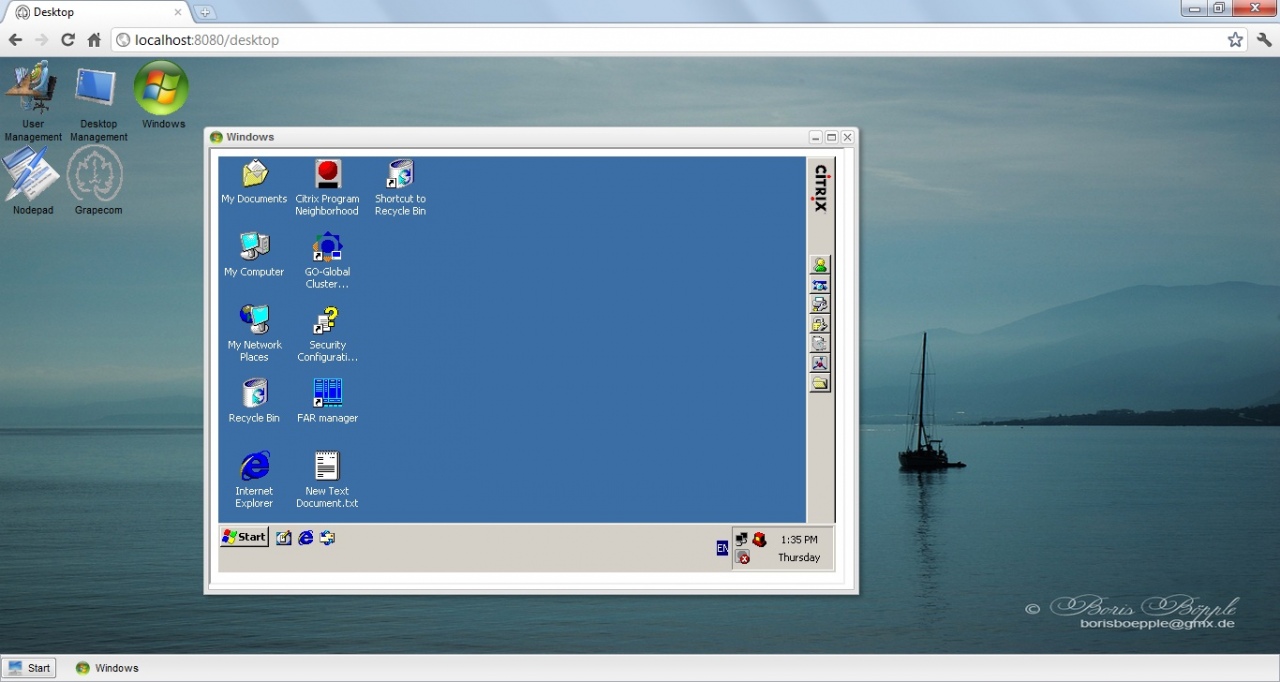
The program works on the principle Browser as Thin Client. The special feature of the program - the browser absolutely solves all taks, which were supposed to be fulfilled by Thin Clients, which allows a user to work at any computer with any operation system, on which one of well-known popular browsers has been designed.The main possibilities of the decision :
1. Administration of users and their rights
2. Creating and flexible configuration of Desktops for different tasks
3. HTTP/HTTPS server
4. FTP server
5. TFTP server
6. Setting of jGrape server
7. Setting of ICA clients and terminal access to Citrix XenApp server
8. Setting of clients and terminal access to Microsoft terminal server
9. Setting of NX clients and terminal access to NX server
10. Setting of VNC clients and terminal access to VNC server
11. Setting of Telnet clients and access to Telnet server
12. Setting of SSH clients and access to SSH server
13. Integration of any WEB application
14. Group management of Thin Clients (GrapeTC Lite)
15. Multi - language interface support
16. Local applications start from the browser
17. Group administration
18. Remote administration
About Enterprise desktop
This Remote Computing program is available in English, German, Russian. It was last updated on 29 September, 2026. Enterprise desktop is compatible with the following operating systems: Windows.
The company that develops Enterprise desktop is Grapecom Ltd.. The latest version released by its developer is 2.0.100. This version was rated by 1 users of our site and has an average rating of 4.0.
The download we have available for Enterprise desktop has a file size of 80.7 MB. Just click the green Download button above to start the downloading process. The program is listed on our website since 2014-12-15 and was downloaded 131 times. We have already checked if the download link is safe, however for your own protection we recommend that you scan the downloaded software with your antivirus. Your antivirus may detect the Enterprise desktop as malware if the download link is broken.
How to install Enterprise desktop on your Windows device:
- Click on the Download button on our website. This will start the download from the website of the developer.
- Once the Enterprise desktop is downloaded click on it to start the setup process (assuming you are on a desktop computer).
- When the installation is finished you should be able to see and run the program.
Program Details
System requirements
Download information
Pricing
Version History
version 2.0.100
posted on 2014-12-15
added support GrapeTC Lite 4.5.1
version 1.5
posted on 2009-05-01
Administration GrapeTC Lite
